11. Global Infrastructure
- Global Infrastructure
Why make a global application?
- A global application is an application deployed in multiple geographies
- On AWS: this could be Regions and / or Edge Locations
- Decreased Latency
- Latency is the time it takes for a network packet to reach a server
- It takes time for a packet from Asia to reach the US
- Deploy your applications closer to your users to decrease latency, better experience
- Disaster Recovery (DR)
- If an AWS region goes down (earthquake, storms, power shutdown, politics)…
- You can fail-over to another region and have your application still working
- A DR plan is important to increase the availability of your application
- Attack protection: distributed global infrastructure is harder to attack
Global AWS Infrastructure
- Regions: For deploying applications and infrastructure
- Availability Zones: Made of multiple data centers
- Edge Locations (Points of Presence): for content delivery as close as possible to users
- More at: https://infrastructure.aws/
Global Applications in AWS
- Global DNS: Route 53
- Great to route users to the closest deployment with least latency
- Great for disaster recovery strategies
- Global Content Delivery Network (CDN): CloudFront
- Replicate part of your application to AWS Edge Locations – decrease latency
- Cache common requests – improved user experience and decreased latency
- S3 Transfer Acceleration
- Accelerate global uploads & downloads into Amazon S3
- AWS Global Accelerator:
- Improve global application availability and performance using the AWS global network
Amazon Route 53 Overview
- Route53 is a Managed DNS (Domain Name System)
- DNS is a collection of rules and records which helps clients understand how to reach a server through URLs.
- In AWS, the most common records are:
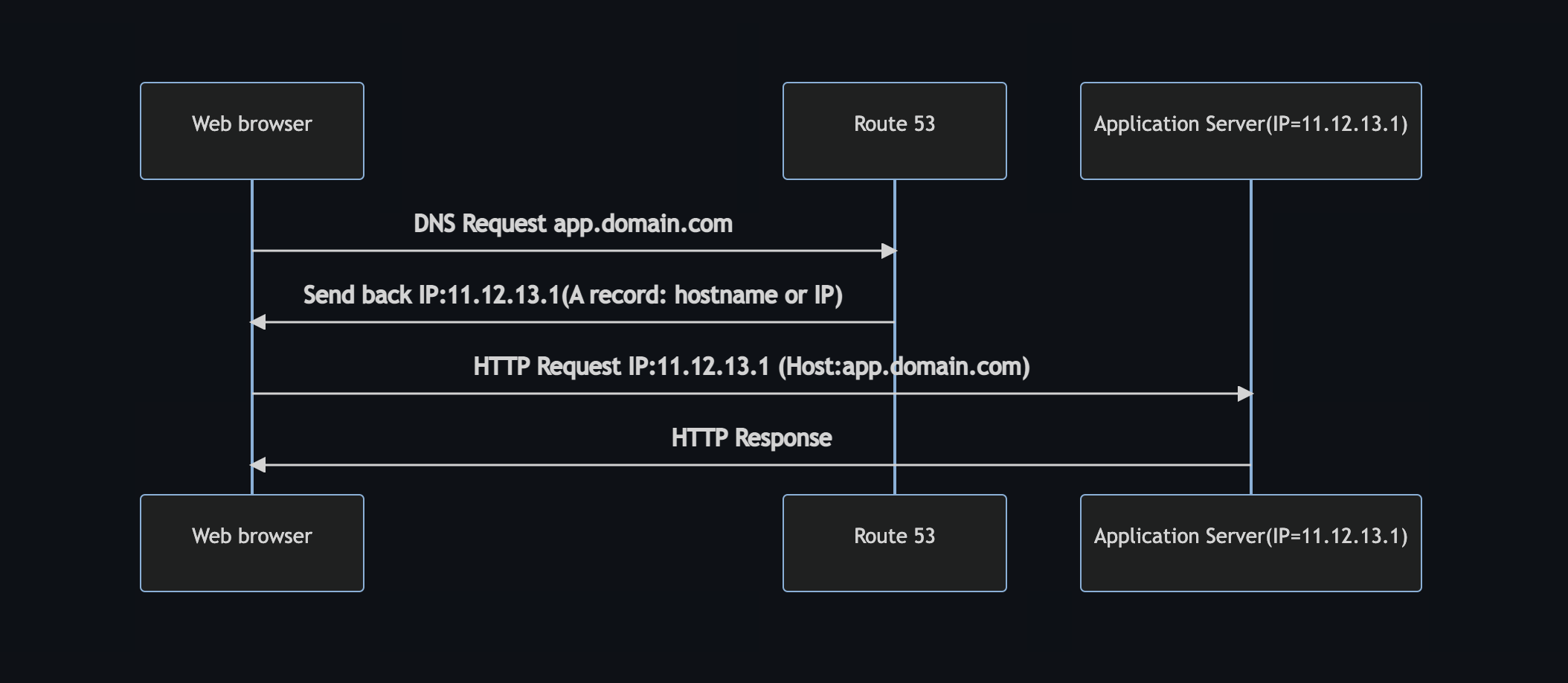
- www.google.com => 12.34.56.78 == A record (IPv4)
- www.google.com => 2001:0db8:85a3:0000:0000:8a2e:0370:7334 == AAAA IPv6
- search.google.com => www.google.com == CNAME: hostname to hostname
- example.com => AWS resource == Alias (ex: ELB, CloudFront, S3, RDS, etc…)
Route 53 - Diagram for A Record
Route 53 Routing Policies
Need to know them at a high-level for the Cloud Practitioner Exam
- simple routing policy
- weighted routing policy
- latency routing policy
- failover routing policy
simple routing policy
- Use for a single resource that performs a given function for your domain
- for example, a web server that serves content for the example.com website.
- You can use simple routing to create records in a private hosted zone
weighted routing policy
- Use to route traffic to multiple resources in proportions that you specify.
- You can use weighted routing to create records in a private hosted zone.
latency routing policy
- Use when you have resources in multiple AWS Regions and you want to route traffic to the region that provides the best latency.
- You can use latency routing to create records in a private hosted zone.
failover routing policy
- Use when you want to configure active-passive failover.
- You can use failover routing to create records in a private hosted zone.
Imagine Route 53 as a wise traffic controller in the cloud, orchestrating how requests to your website find their destination. Each routing policy is a different strategy—a poetic dance of decision-making—that directs traffic based on simple rules or sophisticated conditions. Here’s a high-level, no-nonsense look at four key policies:
1. Simple Routing Policy
What It Is:
The simplest of all. It’s like giving a one-way street—every query goes to the same destination.
How It Works:
- Single Resource: You have one server or resource. Every DNS query is directed to it.
- No Decision-Making: No balancing or sorting; it's straightforward and predictable.
Example:
If you run a small website, you might have a single server at IP address 192.0.2.1. Every request to example.com goes straight to that IP. It’s as simple as flipping a light switch.
2. Weighted Routing Policy
What It Is:
Imagine you’re a conductor blending different musical notes. Weighted routing lets you distribute traffic among multiple servers based on assigned “weights” (percentages).
How It Works:
- Multiple Resources: You set up two or more endpoints.
- Custom Distribution: Assign weights to each. For instance, one server might receive 70% of traffic, while another gets 30%.
- Experimentation & Gradual Rollouts: Ideal for A/B testing or rolling out new features gradually.
Example:
Suppose you have two servers: Server A (weight 7) and Server B (weight 3). When 10 queries hit your domain, approximately 7 go to Server A and 3 to Server B. It’s like deciding which part of your audience gets which song during a concert.
3. Latency Routing Policy
What It Is:
This policy is all about speed—it directs users to the server that promises the lowest delay. Think of it as sending your guests to the nearest exit in a sprawling, busy building.
How It Works:
- Geographical Consideration: AWS measures network latency between the user and your servers.
- Optimal Response: The request is routed to the server that responds fastest, reducing lag and ensuring a snappy experience.
Example:
If you host your website on servers in New York and London, a visitor from Paris will likely be directed to the London server because it offers lower latency. It’s like choosing the fastest route in rush hour—no detours, no wasted time.
4. Failover Routing Policy
What It Is:
In the unpredictable theater of the internet, failover routing is your backup plan. It’s like having a safety net, ensuring that if the primary server stumbles, the show goes on with a secondary resource.
How It Works:
- Primary and Secondary: You designate a primary resource (active when healthy) and a secondary one (used only if the primary fails).
- Health Checks: AWS continuously monitors the primary. If it becomes unresponsive, traffic is automatically rerouted to the secondary.
Example:
Imagine your primary website server is in New York. If it goes down (say, due to maintenance or an unexpected crash), Route 53 directs all traffic to a standby server in San Francisco. It’s the digital equivalent of a backup dancer stepping in when the lead is injured.
Each of these policies is a tool for managing your site's availability, performance, and testing capabilities. They allow you to fine-tune how your visitors experience your site, ensuring that your cloud infrastructure not only works but thrives in a dynamic environment.
References
AWS CloudFront
- Content Delivery Network (CDN)
- Improves read performance, content is cached at the edge
- Improves users experience
- 216 Point of Presence globally (edge locations)
- DDoS protection (because worldwide), integration with Shield, AWS Web Application Firewall
- Source: https://aws.amazon.com/cloudfront/features/?nc=sn&loc=2
CloudFront - Origins
- S3 bucket
- For distributing files and caching them at the edge
- Enhanced security with CloudFront Origin Access Identity (OAI)
- CloudFront can be used as an ingress (to upload files to S3)
- Custom Origin (HTTP)
- Application Load Balancer
- EC2 instance
- S3 website (must first enable the bucket as a static S3 website)
- Any HTTP backend you want
CloudFront vs S3 Cross Region Replication
| CloudFront | S3 Cross Region Replication |
|---|---|
| Global Edge network | Must be setup for each region you want replication to happen |
| Files are cached for a TTL (Time to Live) (maybe a day) | Files are updated in near real-time, Read only |
| Great for static content that must be available everywhere | Great for dynamic content that needs to be available at low-latency in few regions |
S3 Transfer Acceleration
- Increase transfer speed by transferring file to an AWS edge location which will forward the data to the S3 bucket in the target region
- if we try to upload file to Australia S3 bucket it will take time using CloudFront we can rescue time.
- File in USA -> Edge Location(USA) -> S3 Bucket(Australia)
- Test the tool at: https://s3-accelerate-speedtest.s3-accelerate.amazonaws.com/en/accelerate-speed-comparsion.html
AWS Global Accelerator
- Improve global application availability and performance using the AWS global network
- Traffic is routed to your applications using the AWS global network instead of the internet.
- Leverage the AWS internal network to optimize the route to your application (60% improvement)
- 2 Anycast IP are created for your application and traffic is sent through Edge Locations
- The Edge locations send the traffic to your application
- Test the tool at: https://speedtest.globalaccelerator.aws/#/
AWS Global Accelerator vs CloudFront
- They both use the AWS global network and its edge locations around the world
- Both services integrate with AWS Shield for DDoS protection.
- CloudFront – Content Delivery Network
- Improves performance for your cacheable content (such as images and videos)
- Content is served at the edge
- Global Accelerator
- No caching, proxying packets at the edge to applications running in one or more AWS Regions.
- Improves performance for a wide range of applications over TCP or UDP
- Good for HTTP use cases that require static IP addresses
- Good for HTTP use cases that required deterministic, fast regional failover
AWS Outposts
- Hybrid Cloud: businesses that keep an on - premises infrastructure alongside a cloud infrastructure
- Therefore, two ways of dealing with IT systems: • One for the AWS cloud (using the AWS console, CLI, and AWS APIs)
- One for their on-premises infrastructure
- AWS Outposts are “server racks” that offers the same AWS infrastructure, services, APIs & tools to build your own applications on-premises just as in the cloud
- AWS will setup and manage “Outposts Racks” within your on-premises infrastructure and you can start leveraging AWS services on-premises
- You are responsible for the Outposts Rack physical security
AWS Outposts Benefits
- Low-latency access to on-premises systems
- Local data processing
- Data residency
- Easier migration from on-premises to the cloud
- Fully managed service
- Some services that work on Outposts:
- EC2
- EBS
- S3
- EKS
- ECS
- RDS
- EMR
AWS WaveLength
- WaveLength Zones are infrastructure deployments embedded within the telecommunications providers’ datacenters at the edge of the 5G networks
- Brings AWS services to the edge of the 5G networks
- Example: EC2, EBS, VPC…
- Ultra-low latency applications through 5G networks
- Traffic doesn’t leave the Communication Service Provider’s (CSP) network
- High-bandwidth and secure connection to the parent AWS Region
- No additional charges or service agreements
- Use cases: Smart Cities, ML-assisted diagnostics, Connected Vehicles, Interactive Live Video Streams, AR/VR, Real-time Gaming
AWS Local Zones
- Places AWS compute, storage, database, and other selected AWS services closer to end users to run latency-sensitive applications
- Extend your VPC to more locations – “Extension of an AWS Region”
- Compatible with EC2, RDS, ECS, EBS, ElastiCache, Direct Connect …
- Example:
- AWS Region: N. Virginia (us-east-1)
- AWS Local Zones: Boston, Chicago, Dallas, Houston, Miami
Global Applications - Summary
- Global DNS: Route 53
- Great to route users to the closest deployment with least latency
- Great for disaster recovery strategies
- Global Content Delivery Network (CDN): CloudFront
- Replicate part of your application to AWS Edge Locations – decrease latency
- Cache common requests – improved user experience and decreased latency
- S3 Transfer Acceleration
- Accelerate global uploads & downloads into Amazon S3
- AWS Global Accelerator
- Improve global application availability and performance using the AWS global network
- AWS Outposts
- Deploy Outposts Racks in your own Data Centers to extend AWS services
- AWS WaveLength
- Brings AWS services to the edge of the 5G networks
- Ultra-low latency applications
- AWS Local Zones
- Bring AWS resources (compute, database, storage, …) closer to your users
- Good for latency-sensitive applications